
Change orders for small construction companies
Outrigger Back Office writes, sends and tracks change orders for small construction companies: you text or email us 5 details from the field, we write it up the same day if we get it by 2 pm, you reply APPROVED, and it goes to the GC from your own billing email. Then we make sure it gets billed.
How change orders works with Outrigger
Every contractor has done extra work on a handshake. The GC says go ahead, you move the dirt or add the run of pipe, and nobody writes it down. Weeks later the job closes out and that extra work is a fight, or it is just gone. Don't leave money on the table. A change order written the same day is the simplest way to keep a handshake from turning into an argument.
Our change order service is built for owners standing in the field with a phone. You send us 5 things: the GC, the project, the scope, the price and the payment terms. We write it up the same day if we get it by 2 pm, number it, and send it to you. You reply APPROVED, and it goes to the GC from your billing email with you copied.
This is the signature service at Outrigger, and it came straight out of the office of a working civil sitework company in Georgia. We have seen how fast a handshake change order turns into a fight. So every change order gets a number, a place in your job file, and a line on your tracker until it is approved, billed and paid. We work remotely with contractors anywhere in the U.S.
Best for
- Sitework and utility crews whose scope changes in the field
- Owners who agree to extra work on a handshake
- Jobs where unbilled extras keep piling up
- Companies that have lost a fight over undocumented work
- Contractors who want every change numbered and tracked
- Owners who would rather text than type up paperwork
What's included
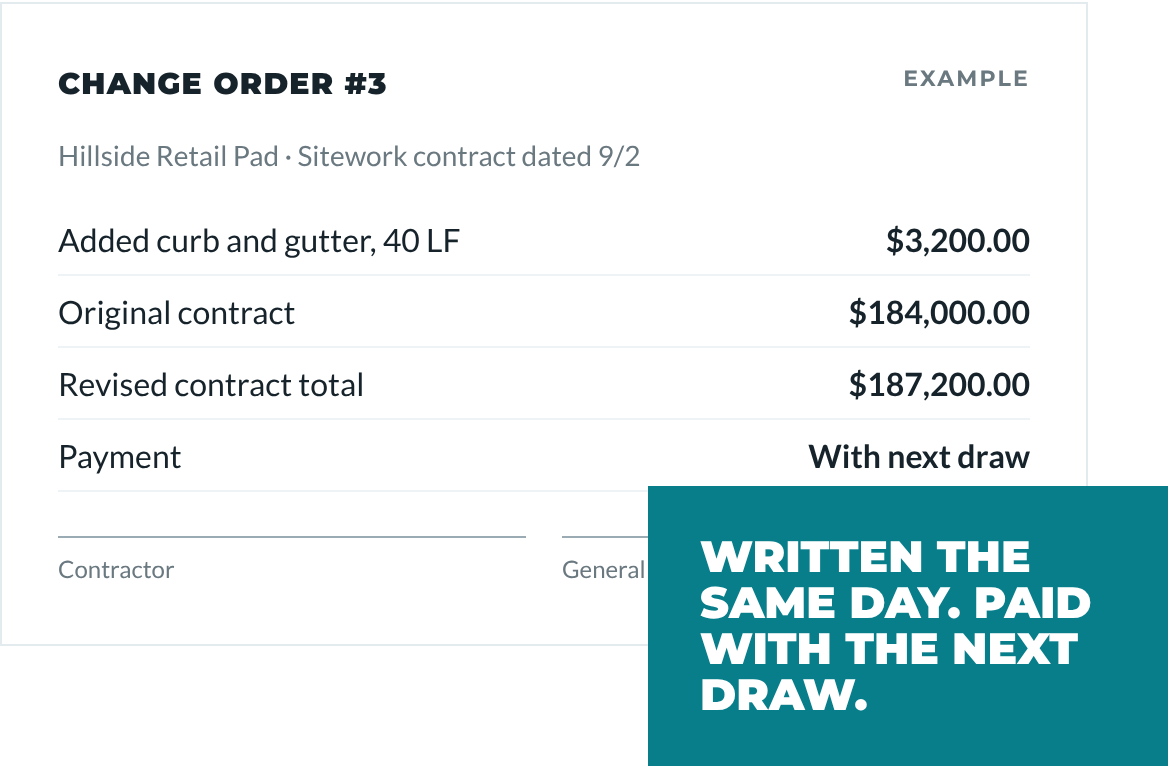
Written the same day
Send us the 5 details by text or email. If we have them by 2 pm, your change order is written up and back to you that same day for approval.
Numbered and tracked per job
Each change order gets a number and goes on that job's log, so you can see every change on a project and its status at a glance.
Sent from your billing email
Once you reply APPROVED, we send it to the GC from your own billing email with you copied. The GC sees your company name, not ours.
Follow up on signatures
If the GC has not signed or responded, we send polite follow ups from your billing email and let you know which change orders are still waiting.
Billed with the next invoice
Approved change orders are added to your next invoice or draw, so extra work does not sit unbilled until the end of the job.
Filed with the job
The change order, the GC's response and any photos you send are saved in the job folder, ready if questions come up at closeout.
What you do
- Text or email the 5 details
- Set the price for the work
- Reply APPROVED before it goes out
- Get the GC's go ahead on site when you can
Why change orders matter
A change order is a written record that the scope of a job changed, and what the change costs. Changes to scope should be in writing and approved before the work or promptly after it. Without that, it is your word against the GC's when the final payment comes around, and unbilled extra work is simply lost money.
Many contracts set a deadline or a process for change orders. Some say you must give notice within a certain number of days, use a specific form, or get a signature before you start. Read your contract so you know the rules on each job, and talk with your attorney if you have questions about what your contract requires. We do not write or review contracts, and we do not set your prices. We write up the change order from the details you give us, keep it organized, and make sure it gets billed.
Our process
Something changes in the field
The GC asks for extra work, or you hit something that changes the scope. You get the go ahead and note the price.
Send us 5 details
Text or email us the GC, project, scope, price and payment terms. Photos help. Our texting line is being set up, and email works today.
We write it the same day
If it reaches us by 2 pm, we write up a numbered change order that day and send it back to you to review.
You approve, we send
You reply APPROVED. We send it to the GC from your billing email with you copied, and log it on the job.
We track and bill it
We follow up until it is signed, add it to your next invoice or draw, and keep it on your tracker until it is paid.
Change Orders FAQ
How much does a change order service cost?
Change orders are included in every Outrigger plan, and plans start at $699 a month. Essentials covers up to 4 change orders a month, Standard up to 8, and Full Office up to 12. Extra change orders are $25 each. Plans are month to month with 30 days' notice to cancel. The Plans page has the full list of what each plan includes.
How fast can you write up a change order?
If we get your 5 details by 2 pm, we write the change order up the same day. Details that come in after 2 pm are written the next business day. Once you reply APPROVED, it goes to the GC from your billing email with you copied, so the GC has it while the work is still fresh.
What do I need to send you for a change order?
Send us 5 things: the GC, the project, the scope of the extra work, the price, and the payment terms. Photos or a quick note on why the work changed are helpful but not required. You can text or email us. Our texting line is being set up, and email works today.
Do you set the price or review my contract?
No. You set the price for every change order, and we write it up exactly as you give it to us. We do not write or review contracts and do not give legal advice. If you are not sure what your contract requires for change orders, such as notice deadlines or forms, check with your attorney.
What happens if the GC does not sign the change order?
We follow up politely from your billing email and keep the change order on your tracker as waiting. You will see it on your Monday update until it is resolved. If the GC refuses or disputes it, that is a conversation between you and the GC, and we keep the paperwork organized so you have the full record.
What tools do I need for change orders?
You need a phone and an email account. You text or email us the details, and we send the finished change order from your own Gmail billing address. Change orders are saved in your job folders in free Google Drive and tracked in a free Google Sheet. Approved changes are billed through your QuickBooks.
Often paired with
Billing & Collections
We set up each job from your contract, send invoices within 1 business day of your request, track what is owed, and send polite reminders from your own billing email.
Learn morePay Apps & Lien Waivers
We set up your schedule of values, prepare monthly pay applications for you to sign, track retainage, and prepare and collect the lien waivers that go with each payment.
Learn moreCompliance & Documents
We keep your company's COI, W-9, licenses and registrations on file, remind you before anything lapses, and send your GC packet whenever a GC asks for it.
Learn more