Billing and collections for small construction companies
Outrigger Back Office handles billing and collections for small construction companies: we set up each job from your contract, send your invoices within 1 business day of your request, track every payment, and follow up politely from your own billing email. You approve every invoice before it goes out.
How billing & collections works with Outrigger
If you run a small crew, billing usually happens at night, after a full day in the field. Invoices go out late, nobody tracks who paid, and a check that should have come three weeks ago is still sitting in a GC's accounts payable pile. That is not a work problem. It is an office problem, and it costs real money every month you are carrying payroll and fuel on your own card.
Our billing and collections service takes that work off your kitchen table. You text or email us what got done, we build the invoice in your QuickBooks, and you approve it. It goes out from your billing email, signed with your company name, so your customers and GCs only ever see your company. We track what is owed, send reminders on a schedule you approve, and tell you every Monday where things stand.
Outrigger was built inside the back office of a working civil sitework company in Georgia, and every step here was tested on real jobs with real GCs first. We know why an invoice gets kicked back for a missing PO number, why a missing COI holds up a check, and how easy it is to forget to bill a job you finished two months ago. We are remote and work with contractors anywhere in the U.S.
Best for
- Owners who bill at night after a day in the field
- A spouse or family member handling billing with no office training
- Crews with several open jobs and GCs at once
- Companies with old invoices nobody has followed up on
- Contractors who want reminders sent but never pushy ones
- Owners who do not want to hire an office manager
What's included
Job setup from your contract
We read your contract or PO and set up the job in your tracker and QuickBooks with the customer, contract amount, billing contact, terms and any invoice requirements the GC spells out.
Invoices out within 1 business day
Tell us what to bill by text or email. We prepare the invoice in your QuickBooks, send it to you to approve, and get it out within 1 business day of your request.
Payment tracking
Every invoice goes on your tracker with its due date. We match payments as they come in, so you always know what is paid, what is open and what is late.
Reminders from your billing email
A courtesy email goes out before the due date and polite reminders after it, from your own billing email, on a schedule you approve at setup. Never threatening, and no lien threats.
Monday update email
Every Monday you get one short email: what got paid last week, what is late, what is coming due, and anything we need from you to keep billing moving.
Morning payment summary
Our built-in automation checks your invoices each weekday morning. A person reviews it, and you hear what got paid so you are not logging in to check.
What you do
- Text or email us what to bill
- Approve each invoice before it goes out
- Forward contracts and POs when you sign them
- Call the customer yourself if a payment is badly stuck
What good construction billing looks like
Getting paid starts before the invoice. Your contract or PO usually says how to bill: who to send it to, what reference numbers to include, how often you can bill, and what has to come with it, such as a lien waiver or an updated COI. If an invoice is missing any of that, many GCs will hold it or send it back, and the clock on your payment starts over. Reading those terms at job setup is the easiest way to avoid a slow check.
Follow up is the other half. A short, polite reminder before the due date catches invoices that got lost in someone's inbox. Steady reminders after the due date keep your invoice near the top of the pile without damaging the relationship. Payment terms and your rights when a customer does not pay depend on your contract and your state, so if a payment turns into a real dispute, talk with your attorney. We keep the paperwork organized so you have what you need for that conversation.
Our process
Free office checkup
On a free 20-minute call we look at how you bill today, what is open and what is late, and show you what to fix first.
Setup
We build your tracker, job folders and billing email from your contracts and load your open jobs and unpaid invoices. Billing setup is included in month one.
You send what to bill
Through the month you text or email us when work is done or a billing date comes up, with photos or tickets if you have them.
We invoice and you approve
We prepare each invoice in your QuickBooks, you approve it, and it goes out from your billing email within 1 business day of your request.
We track and follow up
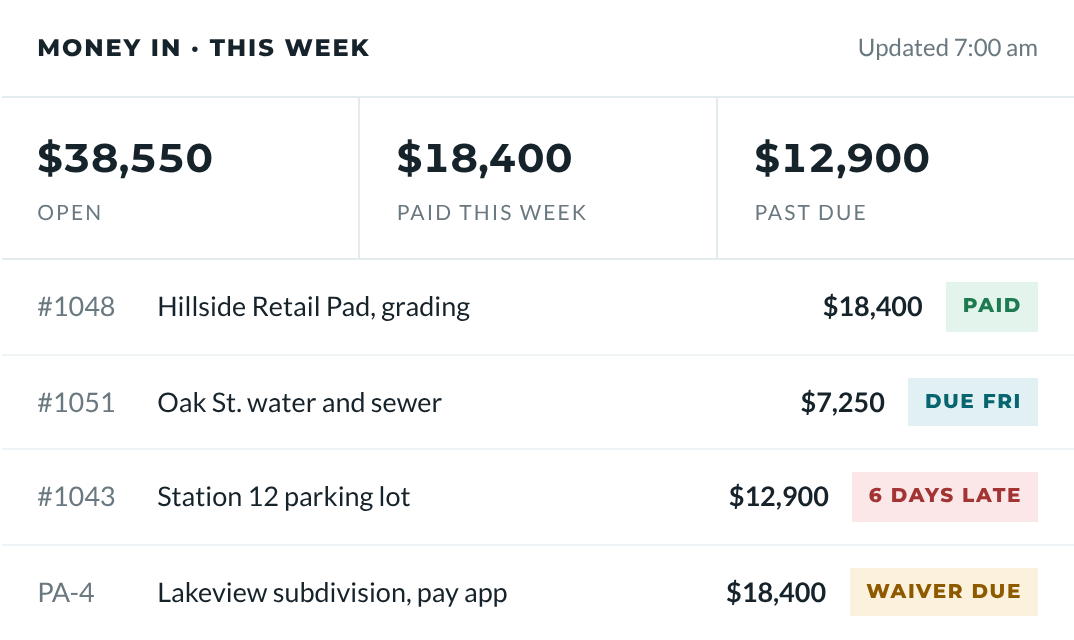
We log payments, send reminders on your approved schedule, and send your Monday update showing what is paid, late, coming due and needed.
Billing & Collections FAQ
How much does it cost to outsource construction billing?
Our plans start at $699 a month, and billing and collections is part of every plan. Essentials covers up to 8 invoices a month, Standard up to 20, and Full Office up to 40. Extra invoices are $15 each. Plans are month to month with 30 days' notice to cancel, and billing setup is included in month one. See the Plans page for the full details.
How fast do my invoices go out?
Invoices go out within 1 business day of your request. You text or email us what to bill, we prepare the invoice in your QuickBooks and send it to you to approve. Once you approve, it goes out from your own billing email. The sooner you tell us the work is done, the sooner your customer has the invoice.
Will my customers know I use a billing service?
No, not unless you tell them. Invoices and reminders go out from your own billing email address and are signed with your company name. Your customers and GCs see your company, not Outrigger. We work behind the scenes, and you stay the face of your business.
Do you call my customers or threaten liens when they pay late?
No. Our reminders are polite emails sent from your billing email on a schedule you approve at setup. We never send threatening messages and never mention liens. We do not file liens or lien notices, and we do not give legal advice. If a payment becomes a dispute, we organize your paperwork so you can take it to your attorney.
What software do I need for outsourced billing?
You need QuickBooks and a Gmail account, and that is it. We work inside your own QuickBooks with accountant access and send from your Gmail billing address. Your tracker and job folders live in free Google Sheets and Google Drive. There is no new software to buy, and you pay for QuickBooks directly.
Can you help collect old unpaid invoices?
Yes, we can load your open and past due invoices onto your tracker during setup and start polite reminders on the schedule you approve. We look at what each customer needs to pay, like a missing waiver or PO number, and tell you what is holding things up. We do not act as a collection agency or give legal advice.
Often paired with
Change Orders
Text or email us 5 details from the field. We write the change order the same day, you reply APPROVED, and it goes to the GC from your billing email.
Learn morePay Apps & Lien Waivers
We set up your schedule of values, prepare monthly pay applications for you to sign, track retainage, and prepare and collect the lien waivers that go with each payment.
Learn moreSub & Vendor Paperwork
We collect W-9s and certificates of insurance from your subs and vendors before they get paid, track COI expiration dates, request renewals and file everything by sub.
Learn more